Game Here
Sunday, 5 February 2017

Monday, 2 January 2017
START YOUR YEAR WITH SOME TECH!!!
Hello and whassup guys?
I haven't seen you in a long time and I apologize for that....
BUT.. Since it's the beginning of a new year I thought for restarting this old shack into something pretty cool. I hope you guys have great time and stay tuned for more of the same.
TILL then PEACE ☮
Wednesday, 24 August 2016
The DZ09 Smartwatch!!!
Unboxing the DZ09 Smart Watch
First lets take a look at the box in which DZ09 SmartWatch is presented to its customers. The box is well made, it is robust and made of sturdy cardboard. When unboxing, I wondered for a moment that most Chinese smartwatches come in the similar styled boxes.
On the top of the box, we have a printed picture of a hand watch that gives a hint to the customers about the device inside. In addition, there are two different adhesive stickers stuck, over the box that highlight the interesting features of the SmartWatch. Maybe the info about the color on the box helps the dealers to give the right colored SmartWatch to the customers buying it. On the back there is nothing printed or sticked.
On opening the box, we see the DZ09 embedded in a black high density foam. Below this we find other watch accessories.
Box contents:
- DZ09 Smart Watch.
- USB charger.
- European network adapter.
- User’s Guide.
- 380 mAh battery.
- Screen saver.
First lets take a look at the box in which DZ09 SmartWatch is presented to its customers. The box is well made, it is robust and made of sturdy cardboard. When unboxing, I wondered for a moment that most Chinese smartwatches come in the similar styled boxes.
On the top of the box, we have a printed picture of a hand watch that gives a hint to the customers about the device inside. In addition, there are two different adhesive stickers stuck, over the box that highlight the interesting features of the SmartWatch. Maybe the info about the color on the box helps the dealers to give the right colored SmartWatch to the customers buying it. On the back there is nothing printed or sticked.

On opening the box, we see the DZ09 embedded in a black high density foam. Below this we find other watch accessories.

Box contents:
- DZ09 Smart Watch.
- USB charger.
- European network adapter.
- User’s Guide.
- 380 mAh battery.
- Screen saver.

Appearance of DZ09 Smart Watch
The front of the DZ09 SmartWatch is occupied by the OGS HD IPS LCD screen of 1.56 inches with a resolution of 240 x 240 pixels. As you can see in the picture,DZ09 Chinese clock is lit with the word SmartWatch.
At the rear of the DZ09 SmartWatch, there is no logo or any details printed even though it is the case with many other smiliar devices in the market. If there is any visuals, it is the speaker outlets. When we remove the cover, we see the battery.
The battery that powers this cheaply priced Chinese SmartWatch has a capacity of 380 mAh lithium. Over it CE quality seal is printed. I’ll leave the rest of the details to the picture to speak for itself.
When we remove the battery from the DZ09 SmartWatch we a micro SD card slot and port for micro SIM.
At the top SmartWatch has its microphone and 0.3 megapixel camerawith a resolution of 320 x 240 pixels. At the bottom we see the only physical button on the wearable.
If you look on the left side of the device we find the micro USB charging port accompanied by a rubber cap. This prevents dust or any other impurities from entering inside. The right side is empty.
 The strap is made of rubber which makes it comfortable and durable to all styles of wearing. The buckle is wide and made of metal. It is not interchangeable, it stays there for the watch’s lifetime.
The front of the DZ09 SmartWatch is occupied by the OGS HD IPS LCD screen of 1.56 inches with a resolution of 240 x 240 pixels. As you can see in the picture,DZ09 Chinese clock is lit with the word SmartWatch.

At the rear of the DZ09 SmartWatch, there is no logo or any details printed even though it is the case with many other smiliar devices in the market. If there is any visuals, it is the speaker outlets. When we remove the cover, we see the battery.

The battery that powers this cheaply priced Chinese SmartWatch has a capacity of 380 mAh lithium. Over it CE quality seal is printed. I’ll leave the rest of the details to the picture to speak for itself.

When we remove the battery from the DZ09 SmartWatch we a micro SD card slot and port for micro SIM.

At the top SmartWatch has its microphone and 0.3 megapixel camerawith a resolution of 320 x 240 pixels. At the bottom we see the only physical button on the wearable.

If you look on the left side of the device we find the micro USB charging port accompanied by a rubber cap. This prevents dust or any other impurities from entering inside. The right side is empty.

The strap is made of rubber which makes it comfortable and durable to all styles of wearing. The buckle is wide and made of metal. It is not interchangeable, it stays there for the watch’s lifetime.

Specifications of DZ09 Smart Watch.
- Model: DZ09.
- Processor: 533 MHz CPU MTK6260A.
- Memory: 128 Mb Card 64Mb expandable to 32 GB.
- Screen: 1.56 inch TFT LCD HD OGS.
- Resolution: 240 x 240 pixels.
- Bluetooth: version 3.0.
- Ports: Micro USB.
- Battery: 380 mAh Li-Ion.
- SIM Micro SIM.
- Camera: 0.3 megapixel
- Camera resolution: 320 x 240 pixels.
- Standby time: 180 hours approx.
- Talk time: 3 hours approx.
- Bluetooth Talk Time: 3.5 hours approx.
- Bluetooth Standby time: 120 hours approx.
- Networks: GSM850 / 900/1800 / 1900MHz.
- Audio Format: AMR, AAC, MP3, MIDI.
- Video format: MP4, 3GP, AVI.
- Photo format: JPG, GIF.
- Dimensions: 43.5mm x 40mm x 9.8mm.
- Weight: 51 grams.
- Languages: English, Italian, German, Danish, Spanish, Polish, Turkish, Portuguese and Russian.
- Colours: Black, white and bronze.

Watchfaces, themes and menus of DZ09 Smart Watch
- Watchfaces.
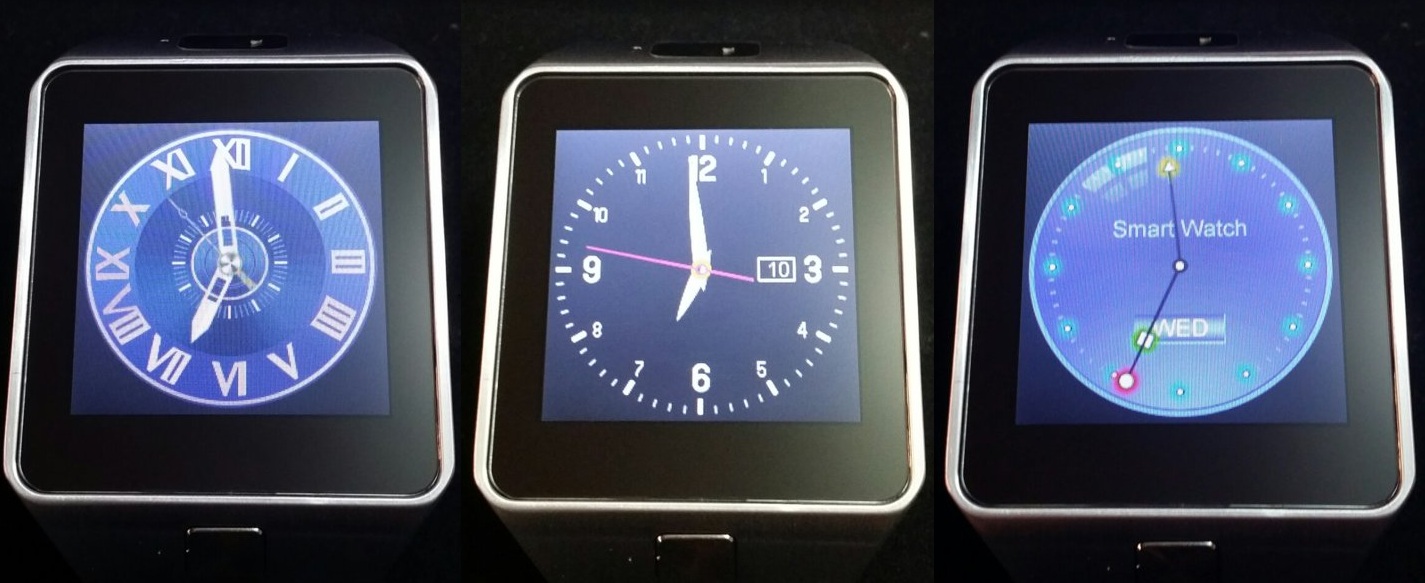
This cheap Chinese SmartWatch has three different watchfaces, but yes, all the themes have the circular shape and follow analog styles.
- Themes
There are five SmartWatch themes and all of them are colorful, although the first theme in the image below, is the most sober of all with limited colors.

- Menus.
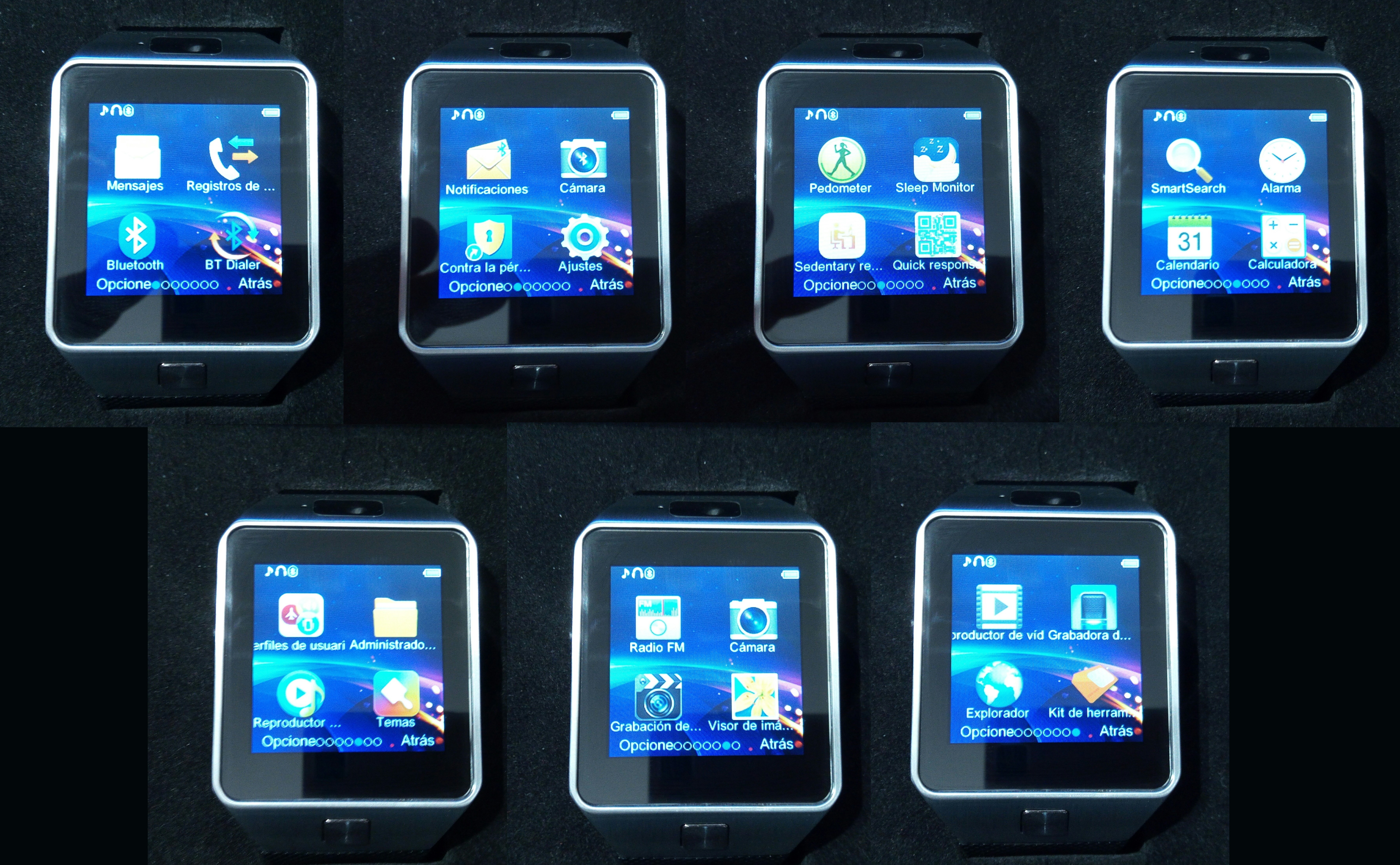
This smartclock has seven menus. I made a list of items you can see in each of these screens.
- First screen: messages, call logs, and BT Bluetooth Dialer.
- Second screen: Notifications, remote camera, anti-lost and adjustments.
- Third screen: Pedometer, sleep monitor, alert inactivity and QR code.
- Fourth screen: Search, alarm, calendar and calculator.
- Fifth screen: User profiles, file manager, music player and themes.
- Sixth screen: FM radio, camera, video recording and image viewer.
- Seventh and final screen video player, sound recorder, browser and toolkit.

- Transition menu.
The following figure shows you the transition between the screens.
 If you got very little idea about the transitions, do watch the video below to get a clear understanding.
- Watchfaces.
This cheap Chinese SmartWatch has three different watchfaces, but yes, all the themes have the circular shape and follow analog styles.
- Themes
There are five SmartWatch themes and all of them are colorful, although the first theme in the image below, is the most sober of all with limited colors.

- Menus.
This smartclock has seven menus. I made a list of items you can see in each of these screens.
- First screen: messages, call logs, and BT Bluetooth Dialer.
- Second screen: Notifications, remote camera, anti-lost and adjustments.
- Third screen: Pedometer, sleep monitor, alert inactivity and QR code.
- Fourth screen: Search, alarm, calendar and calculator.
- Fifth screen: User profiles, file manager, music player and themes.
- Sixth screen: FM radio, camera, video recording and image viewer.
- Seventh and final screen video player, sound recorder, browser and toolkit.
- Transition menu.
The following figure shows you the transition between the screens.
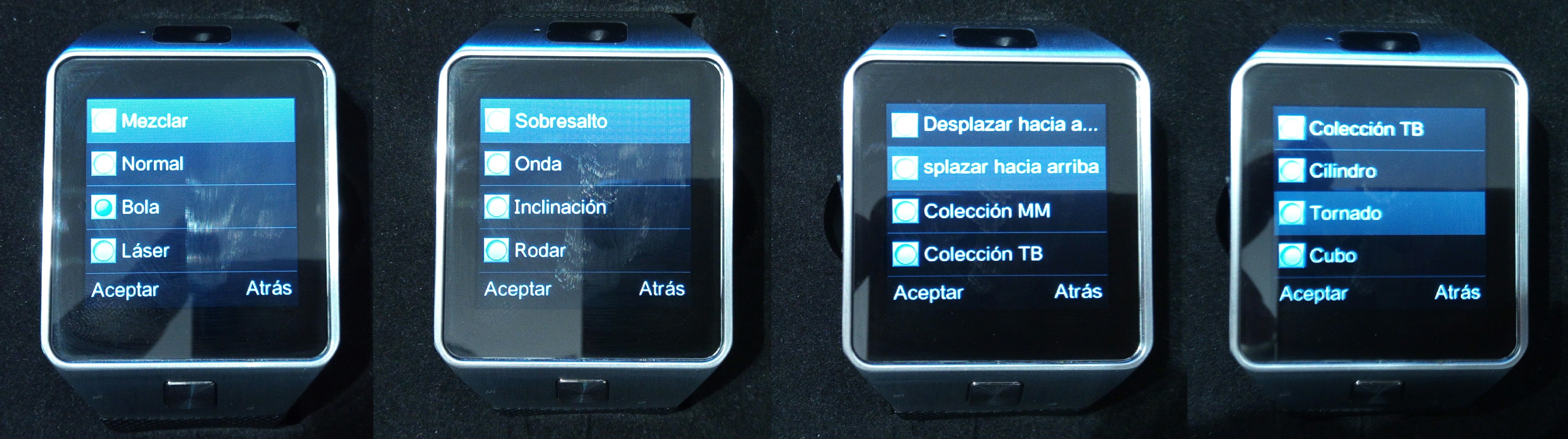
If you got very little idea about the transitions, do watch the video below to get a clear understanding.
Features of DZ09 Smart Watch

- Remote Camera:
We can control the camera of your smartphone using DZ09 Smart Watch. The watch can trigger a image capture and show you the picture taken on the screen.
- Remote Music:
You can play music stored in your smartphone via bluetooth
- Anti inactivity:
DZ09 Smart Watch can raise an alarm when you are sedentary for a long time. It tells you that you must move a bit.
- Sleep Monitor:
Used to keep track of the sleep hours.
- Sound recorder:
In we can record any sound, conversations, music etc
- Pedometer:
To keep track of the heart beat, speed and distance traveled.
- Push notifications:
Any notification that comes to our smartphone will be automatically sent to the DZ09 Smart Watch.
- Anti-lost:
When your smartphone is linked to DZ09 it notifies you through beeps while you are moving away from your phone. So with a DZ09 tied in your hands you can’t forget or lose your Smartphone.
- Mobile Search:
This option helps to find the smartphone when the SmartWatch beeps.

- Other functions of DZ09.
Freehands, Call log, Message log, Notifications, Diary, Calculator, Alarm, Bluetooth headphones, Calendar and Compass.
Amazon:-DZ09 on Amazon
Flipkart:-DZ09 on Flipkart
The Meccanoid G15
First Look And Review
Meccanoid is a buildable robot from Erector / Meccano, yes the guys who make the metal construction sets. The G15 is the smaller version of the robot, but it's still really big at around 2 feet tall (61cm), the larger G15 KS is around 4 feet tall!
 Meccanoid is very much a robot that you build. If you want a ready built robot then try something like Miposaur. This is a Meccano robot, building it is a big part of the experience.
Meccanoid is a buildable robot from Erector / Meccano, yes the guys who make the metal construction sets. The G15 is the smaller version of the robot, but it's still really big at around 2 feet tall (61cm), the larger G15 KS is around 4 feet tall!
The Box
First of all, Meccanoid looks like an impressive gift. The box is big and weighty. Not the most important factor, but it does add to the wow factor.
The Build

Meccanoid is put together using standard Meccano nuts and bolts. The required tools are included.
Compared to regular Meccano the build is actually fairly straightforward. The pieces are sturdy polycarbonate rather than metal and this means that they can have indentations where the nuts go, this makes the process of connecting nuts and bolts fairly easy. The nuts stay put while you turn the bolts.
The build time is long though, expect it to take several hours. You can speed things up by having more than one person working on the build, there are plenty of sections that can be built in parallel.
My eight year old was capable of building the robot. More capable than me in many cases! But he wouldn't have had the staying power to built the whole thing.
There weren't many spare nuts and bolts left at the end. More would have been appreciated as we're bound to lose a few over time and also to allow us to attach other things. You can use standard Meccano pieces though.
The LEDs for the eyes seem oddly placed, they are quite far back and a lot of the light doesn't make it to the eyes. It looks like they can be repositioned though and we can always 3D print a part to keep the light in.
Turning Meccanoid On
We connected up Meccanoid according to the instructions. Well not quite according to the instructions as the motor cables seemed to be drawn upside down in the instructions that we have. There wasn't any choice in how to actually connect them though so we did what worked.
We turned Meccanoid on and it ran through a series of tests requesting confirmation that each action had working. Everything worked first time.
I was very glad about this after several hours of assembly!
Playtime
When you turn Meccanoid on it runs through an introductory tutorial that explains some of the features. This works really well for getting started. My kids aged 8 and 6 were soon getting Meccanoid to tell (bad) jokes, leading him round the room by the hand and teaching him new routines using LIM.
LIM is learned intelligent motion, basically you put Meccanoid into a record mode where it reads motion from the servos in the arms and can then play back the motion. This is really effective and fun.
The Walk with Me function where you guide Meccanoid by his arm was a big hit with my 7 year old. Shaking hands and doing a high five work really well - Meccanoid actually senses your movement via the servos.
Meccanoid responds to voice commands. We had trouble with some commands initially but after a firmware update via USB this improved but still requires several attempts sometimes. I felt like Meccanoid was training me to say the words in the right way. Our accents may be a contributing factor. Voice commands that we created ourselves worked pretty well.
Meccanoid's eye colour is used very effectively to signal the mode he's in so it's easy to see what to do next.
We had to turn the volume up to maximum to hear the voice above the sound of the servos.
For More>>>Official Site
READY TO GO!!!
Alright Guys...!!!
Since we have successfully started this blog we will be adding more content about tech...
So Sit Tight And Don't Forget To Share!!!
Subscribe to:
Posts (Atom)